
Policy Manager Guides
These guides cover the day-to-day operations of a Policy Manager — from integrating your smart contracts with ACE to configuring and managing compliance policies.
How it all fits together
The Policy Manager revolves around a handful of entities that work together to enforce compliance on your smart contracts. Understanding how they relate to each other makes the individual guides much easier to follow.
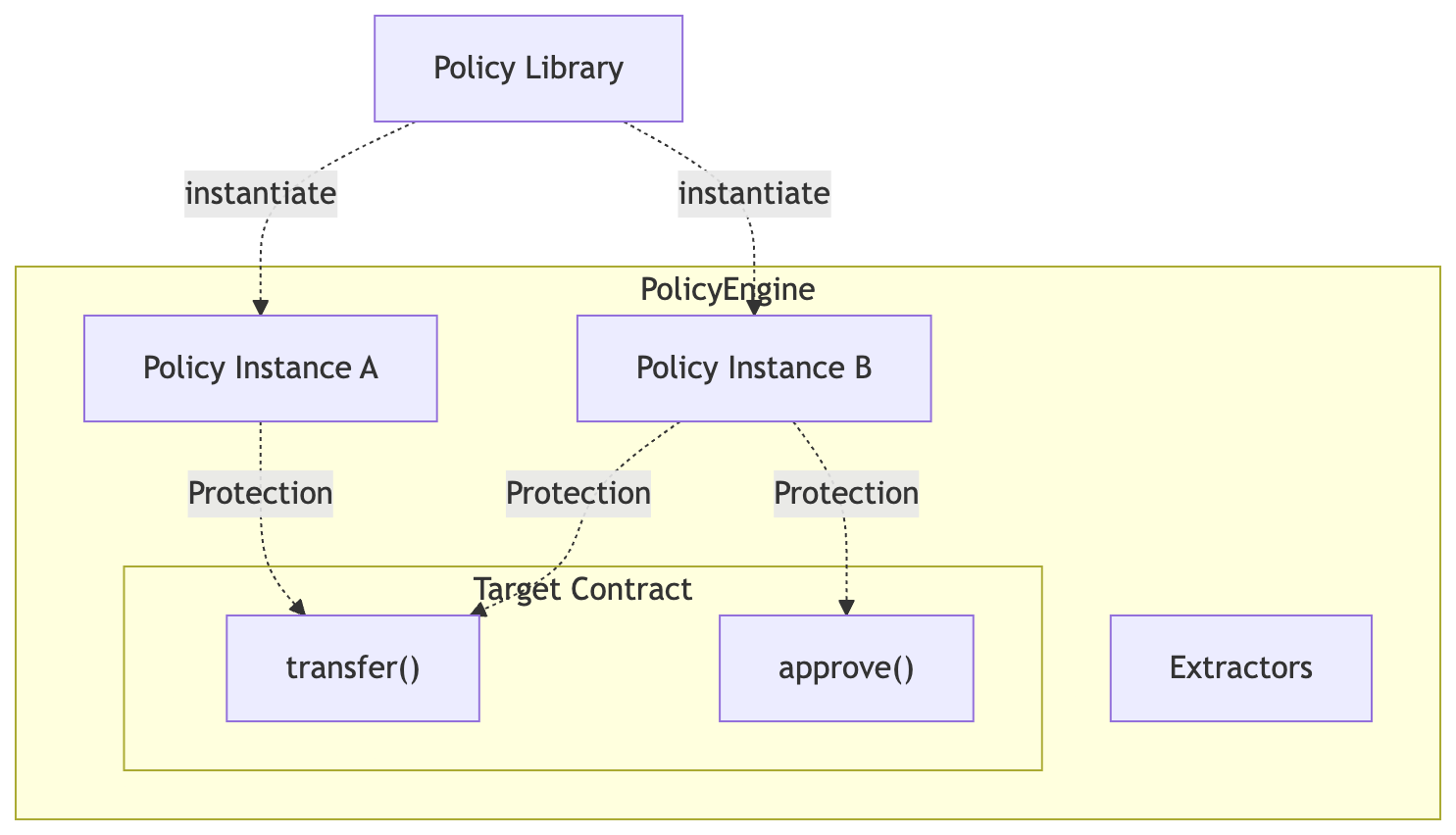
- PolicyEngine — The on-chain orchestrator that evaluates policies. Everything — targets, policy instances, and extractors — is scoped to a single engine.
- Extractors — Modules that decode transaction calldata into named parameters (sender, amount, etc.) so policies can evaluate them. Attached to the engine at creation time.
- Target — A smart contract associated with an engine through automatic onchain detection or manual API registration.
- Policy Type — A reusable compliance rule from the Policy Library (e.g., allowlist, volume limit, pause toggle).
- Policy Instance — A deployed policy contract created from a policy type, configured with your parameters, and scoped to an engine.
- Protection — The binding between a policy instance and a specific function on a target contract. This is what makes a function "policy-protected."
- Data Validator — An optional contract attached to an identity policy's credential source that validates the contents of a credential (e.g., a jurisdiction allow/deny list), not just its existence.
- Managed offchain policy (MVP) — A CRE workflow and onchain validator managed by Chainlink that evaluate external risk data before issuing a permit for a specific transaction intent.
Typical setup flow
- Create a PolicyEngine with extractors for your contract type: built-in ERC-20 or ERC-3643, built-in
CCIP-AdvancedPoolHooks, or your own type. - Integrate your contract through
PolicyProtectedor a direct Policy Engine call. - Deploy and connect your contract. ACE can detect its onchain attachment or accept manual registration.
- Create policy instances from the Policy Library with your configuration.
- Attach policies to functions by creating protections.
Smart contract integration
- Making Your Contract ACE-Compatible — what your contract needs to work with ACE (inheriting
PolicyProtected, adding therunPolicymodifier) - Protect CCIP Token Pools with ACE — connect CCIP AdvancedPoolHooks and enforce policies on cross-chain token transfers
- Building a New ERC-20 Token — reference implementation for a compliance-ready ERC-20 token
- Building a New ERC-3643 Token — reference implementation for an ERC-3643 security token
- Upgrading Existing Contracts — how to add ACE compliance to an already-deployed upgradeable contract
- Security Considerations — key security patterns and pitfalls when integrating with ACE
Policy engine and policy management
- Managing Policy Engines — create, view, update, and archive policy engines
- Managing Targets — detect or register deployed contracts as targets under a policy engine
- Managing Policies — browse policy types, create and configure policy instances
- Protecting Target Functions — bind policy instances to specific functions on your target contracts
- Managing Data Validators — enforce rules on credential contents (e.g., jurisdiction allow/deny lists) by attaching Data Validators to identity policies
- Custom Policies — write, deploy, and register your own policy contract, then use it like a library policy
- Offchain Policies — understand the managed and custom models, configure the managed wallet screening MVP, and integrate offchain permits